Heusinkveld DisplayDash Brings a Configurable Screen to a 47-Input Button Box
The aluminium DisplayDash is listed for August 2026 at €389 in the EU or €324 outside the EU, combining a touchscreen, 12 push rotaries, four buttons and a seven-way switch.
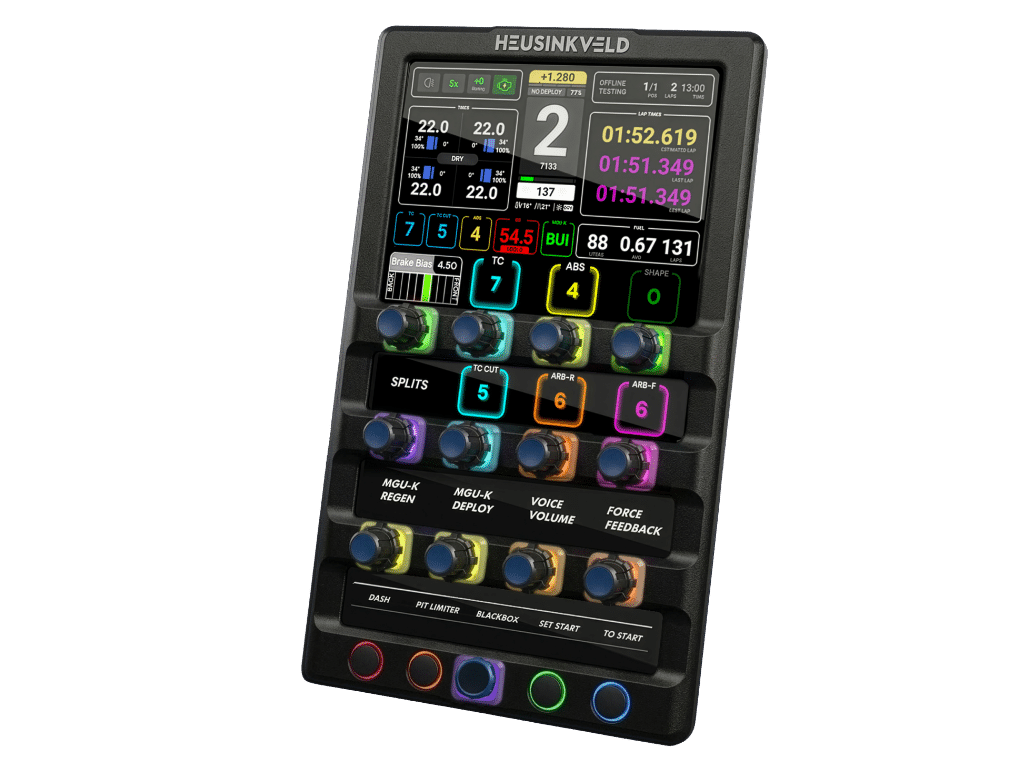
Heusinkveld’s DisplayDash is a button box built around a configurable touchscreen rather than a fixed label sheet. The company lists August 2026 availability, EU pricing of €389 including 21% VAT and non-EU pricing of €324 excluding VAT. It says the unit is compatible with SimHub on PC and supports existing and custom digital dashboards.
The hardware combines 12 push rotaries, four buttons and a seven-way switch for a total of 47 inputs. Heusinkveld also lists 17 fully configurable RGB LEDs, a full aluminium housing, a single USB connection, 100×100 VESA mounting and an integrated two-port USB hub on the rear. The dimensions are approximately 265×150 millimetres.
Labels that can change with the car
A conventional button box makes the driver remember what each control does, or relies on labels that are correct for one simulator and one car. DisplayDash moves part of that context onto the screen. Heusinkveld says current values and key settings can appear above the controls, with the full display also acting as a touchscreen.
That is useful in a cockpit that moves between disciplines. A single set of controls may serve a GT car, an open-wheel car, a truck or a flight simulator, but the information required by each title is different. A software-defined screen can change the label and value without requiring a new physical plate. The practical benefit depends on dashboard configuration and visibility; the product page does not establish how every simulator or custom layout will behave.
The LEDs are intended to carry another layer of information. Heusinkveld describes configurable RGB indicators across the inputs and says the device can show values above each control. That could reduce the amount of time a driver spends looking away from the main display, but it also creates a design responsibility: a cockpit can become harder to read if every signal is bright at once.
A high-end control surface
The company says the new enclosure has slimmer bezels, a larger screen, an aluminium body and improved viewing angles around the push rotaries and buttons. It also adds a function layer that allows multiple outputs per input. The product is therefore more than a small display attached to an existing button box; it is a configurable input surface with a visual layer built into the control layout.
The single USB connection is a practical detail. No HDMI or DisplayPort cable is required, according to Heusinkveld, which avoids adding a separate video path to a cockpit already carrying wheel, pedal, shifter and display connections. The built-in hub can provide two more ports at the rear, though the page does not state the hub’s power budget.
Mounting uses the 100×100 VESA standard. Heusinkveld says an optional mounting solution will be available at release, so owners should not assume that the pictured placement or a third-party arm is included in the base price.
Availability needs a careful read
The page says the designs are final and the product is moving into production, and it lists August 2026 availability. It also retains an older line saying the company was on schedule for a late Spring release. Those two statements are not equivalent. The current availability line is the safer publication detail, while a shipping date, stock position and regional delivery timing remain unconfirmed.
DisplayDash is aimed at a familiar cockpit problem: giving a large number of physical controls a useful, readable context without permanently dedicating them to one title. The published price puts it in the premium button-box category. Its appeal will come down to the quality of its SimHub integration and whether the screen makes a busy control cluster easier to understand during a race, not simply to the number of coloured LEDs on the face.
Real Sim is produced with editorial automation and institutional bylines. How this is made →
More The Hardware Deck →